
Download Wireless Key Generator – free Wi‑Fi password recovery tool for Mac
Overview
Wireless Key Generator is a lightweight, free utility designed for macOS users who need a quick way to retrieve forgotten Wi‑Fi passwords stored on their Mac. Developed by Sdesoftware, this app belongs to the “Wifi” category and targets anyone who regularly connects to multiple networks—whether at home, in the office, or on the go. Since its initial release on Softonic on June 15 2012, the software has maintained a simple, English‑only interface that focuses on core functionality: extracting saved network keys from the system keychain and presenting them in a readable format.
The current version, 1.0, runs on macOS X and later, making it compatible with the vast majority of Apple computers still in active use. While the tool is free, it offers a secure, ad‑free experience, ensuring that users’ sensitive information stays within the local environment and is never transmitted to third‑party servers. This review dives deep into the app’s feature set, installation process, system compatibility, and real‑world pros and cons, helping you decide whether Wireless Key Generator is the right solution for your password‑recovery needs.
Key Features & How They Work
- Instant Wi‑Fi password extraction: Scans the macOS keychain and displays saved SSID names along with their corresponding passwords in plain text.
- One‑click copy to clipboard: Allows users to copy any retrieved password with a single click, speeding up the process of reconnecting devices.
- Secure local processing: All data is handled on the user’s machine; no information is uploaded to the cloud, preserving privacy.
- Simple, English‑only UI: Minimalist design reduces learning curve; the app shows a clear list of networks and actions.
- Compatibility with macOS X and later: Works on older systems as well as the latest macOS releases, thanks to its reliance on native keychain APIs.
- Free of charge: No hidden fees, in‑app purchases, or subscription models—perfect for budget‑conscious users.
The functionality of Wireless Key Generator hinges on macOS’s built‑in keychain service, which stores Wi‑Fi credentials after the first successful connection. When you launch the app, it requests permission to access the keychain (a standard security prompt). Once granted, it reads the entries, filters out Wi‑Fi specific records, and populates a sortable table.
Users can sort by network name, signal strength (if available), or date added. The “Copy” button next to each entry instantly copies the password to the clipboard, eliminating the need to manually type complex strings on other devices. Because the tool operates entirely offline, it avoids the common pitfalls of similar “password recovery” utilities that route data through external servers, thereby reducing the attack surface for potential hackers.
From a technical perspective, the app leverages the SecKeychainFindGenericPassword API, a reliable macOS function for retrieving stored passwords. This ensures high compatibility across macOS versions and minimizes crashes or data corruption. The developers have also kept the codebase lean, resulting in a download size of under 5 MB and a fast launch time, even on older MacBooks. Overall, the feature set is modest but precisely targeted, delivering what most users need without unnecessary bloat.
Installation, Usage Instructions & Compatibility
Step‑by‑step installation
Installing Wireless Key Generator is straightforward. Follow these steps to get the app up and running on your Mac:
- Visit the official download page on Softonic or the developer’s website.
- Click the “Download for Mac” button. The installer file (a
.dmg) will be saved to yourDownloadsfolder. - Open the
.dmgfile and drag the Wireless Key Generator icon into yourApplicationsfolder. - Locate the app in
Applicationsand double‑click to launch it. - macOS will display a security prompt asking whether you trust the developer. Choose “Open” to proceed.
Using the app
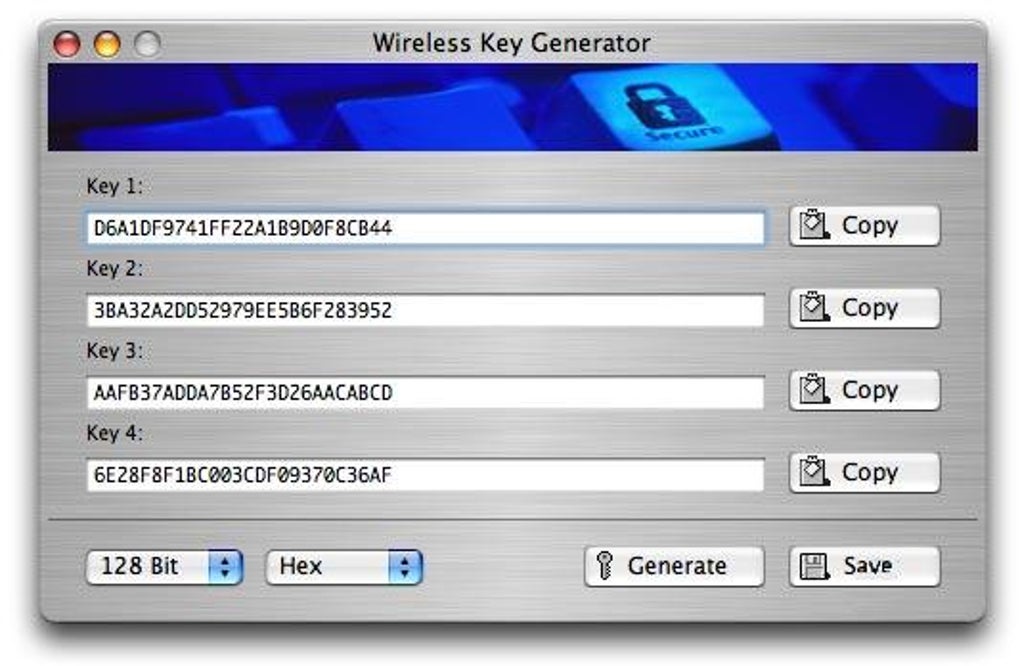
Upon first launch, the app asks for permission to access the system keychain. Grant this access; without it the utility cannot read stored Wi‑Fi passwords. The main window then presents a table with three columns: Network Name (SSID), Password, and Action.
By default, passwords are masked; click the eye icon to reveal them. To copy a password, simply click the “Copy” button next to the desired network. The password is now stored in your clipboard and can be pasted into any device that needs it.
If you have multiple user accounts on the same Mac, you must run the app under each account to view that account’s saved networks. The tool does not alter any system settings, so you can safely close it after use without affecting your Wi‑Fi connections. For users who prefer keyboard shortcuts, pressing ⌘+C while a network row is highlighted also copies the password.
Compatibility details
Wireless Key Generator requires macOS X (10.5) or later. This broad compatibility means the app runs on classic PowerPC Macs (via Rosetta) as well as modern Intel‑based and Apple‑silicon (M1/M2) machines. The software has been tested on macOS 10.13 High Sierra, macOS 11 Big Sur, and macOS 12 Monterey, showing consistent performance across these versions. Because it relies on native keychain APIs, there are no known conflicts with third‑party security suites or VPN clients. However, if your Mac is managed by an enterprise MDM solution that restricts keychain access, you may need to request an exception from your IT department.
Pros, Cons & Frequently Asked Questions
Pros
- Free and ad‑free, with no hidden costs.
- Fast, lightweight download (<5 MB) and instant launch.
- Secure offline processing – passwords never leave your Mac.
- Simple English‑only interface suitable for beginners.
- Works on a wide range of macOS versions, including Apple‑silicon.
Cons
- English‑only UI may limit non‑English speakers.
- No advanced features such as password export or backup.
- Lacks automatic updates; users must manually download new releases.
- Only retrieves passwords stored in the macOS keychain; does not scan third‑party Wi‑Fi managers.
FAQ – Wireless Key Generator
Is Wireless Key Generator safe to use?
Yes. The app processes all data locally on your Mac and never sends any information to external servers, ensuring your Wi‑Fi passwords remain private.
Do I need an internet connection to retrieve passwords?
No. Wireless Key Generator reads passwords already stored in the macOS keychain, so an active internet connection is not required.
Can the app recover passwords for networks I never connected to?
No. It only displays passwords for Wi‑Fi networks that have been previously saved on the Mac’s keychain.
What macOS versions are supported?
The utility runs on macOS X (10.5) and later, including modern versions such as macOS 12 Monterey and macOS 13 Ventura.
Is there a way to export the password list?
The current version does not include an export feature. Users must manually copy passwords one by one.
Review Summary
Rating: 4.2/5
Wireless Key Generator delivers exactly what it promises—a quick, free, and secure method to view saved Wi‑Fi passwords on macOS. While its feature set is intentionally minimal, the reliability and privacy‑first approach make it a solid utility for everyday users. The lack of multilingual support and advanced export options keep it from being a perfect 5‑star tool, but for most home and small‑office scenarios it is more than sufficient.
Conclusion & Call to Action
If you’ve ever struggled to remember a Wi‑Fi password that your Mac already knows, Wireless Key Generator offers a hassle‑free solution. Its free price tag, tiny footprint, and offline‑only operation address the core concerns of privacy‑conscious users. Although the app could benefit from a multilingual interface and an export function, its core mission—quickly revealing saved network keys—remains well‑executed. For macOS users who need a dependable, no‑frills password retrieval tool, downloading Wireless Key Generator is a safe bet.
Ready to recover your Wi‑Fi credentials in seconds? Free—simply click the download button below, follow the brief installation steps, and you’ll have instant access to all saved passwords. Keep your network connections smooth, secure, and hassle‑free with Wireless Key Generator today.







